Claude Tag 怎样当上 Anthropic CI/CD 故障的第一响应人
AI incident response for CI/CD: Claude on call at Anthropic用 AI 处理 CI/CD 故障:Claude 在 Anthropic 值班
A few weeks ago, I was on-call and my colleague Slacked me a message at 10pm: roughly 44 tests on a new service weren’t firing.
几周前轮到我值班,晚上 10 点同事在 Slack 上找我:一个新服务上大概有 44 个测试没跑起来。
In the past, I would have stopped what I was doing, sat down with my laptop, sighed wearily, and began an hour-long investigate-and-fix process. But now, my workflow is entirely different: I pull in @Claude, and ask what it sees.
搁以前,我得放下手头的事,抱着电脑坐下,长叹一口气,然后开始一个小时左右的排查加修复。现在我的做法完全不一样了:把 @Claude 拉进来,问它看到了什么。
In this case, Claude found the tests disappeared when a feature flag got turned on that morning, and also that it would be safe to revert. I asked my colleague to revert the flag. Claude pinged me on Slack 3 minutes later to verify the skip rules had indeed been removed and the error rate was back to baseline.
这一回,Claude 查出来那天早上打开了一个功能开关(feature flag),测试就是从那时候开始不见的,它还确认了回滚是安全的。我让同事把开关回滚了。3 分钟后 Claude 在 Slack 上找我,确认跳过规则确实已经撤掉,错误率也回到了基线。
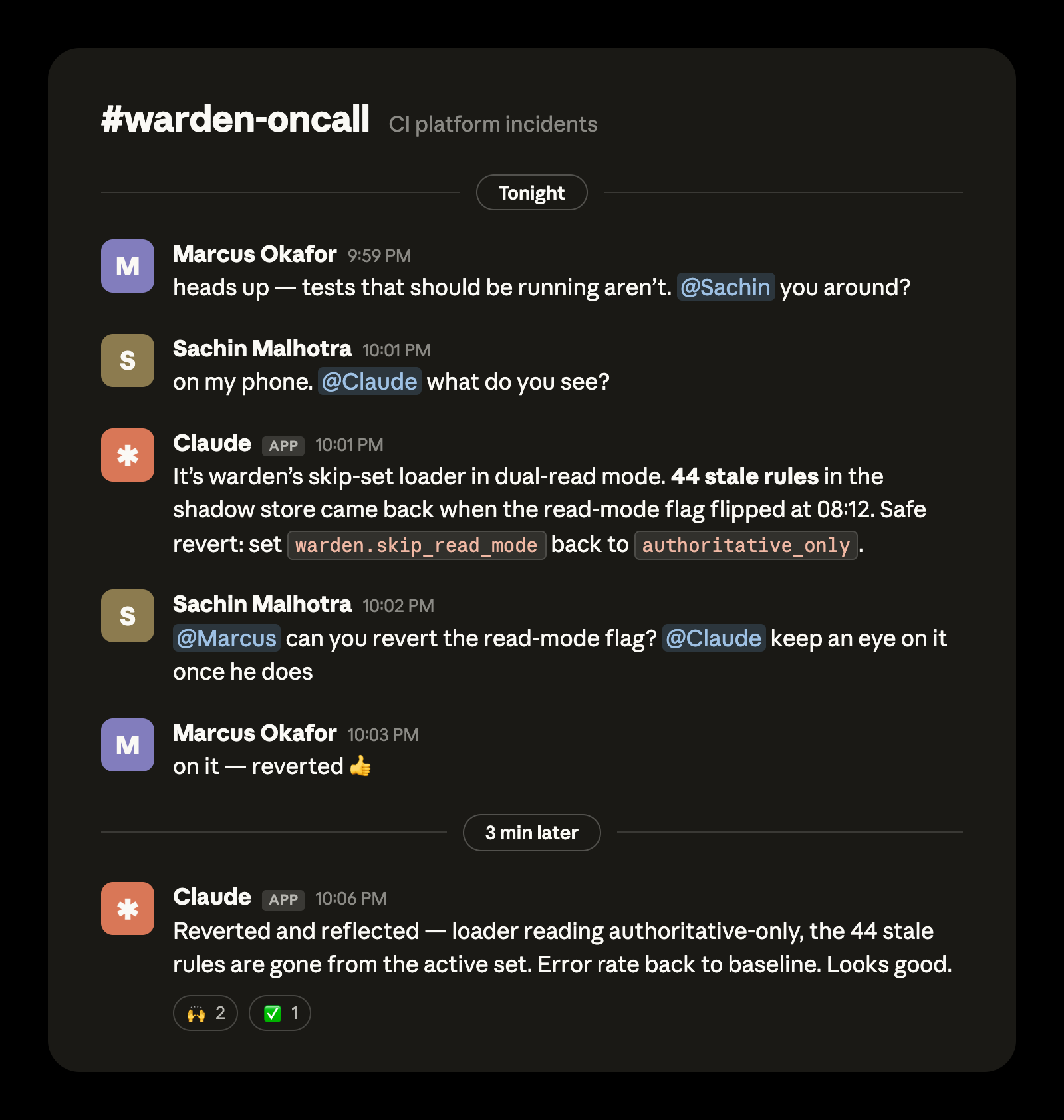
Redesigned from a real exchange for clarity.
根据一次真实对话重新排版,便于阅读。
For the last several months Claude Tag has been the on-call first responder for CI/CD failures at Anthropic. Not only has this helped with our social lives, it has given every CI incident an instant first responder: Claude authored the first situation report in every recent incident that had one, typically publishing its first analysis within 15 minutes.
过去几个月,Claude Tag 一直是 Anthropic CI/CD 故障的值班第一响应人。这救了我们的社交生活,也让每一起 CI 故障都立刻有人接手:最近凡是写了态势报告(situation report)的故障,第一份都是 Claude 写的,通常在 15 分钟内就发出第一份分析。
In this article we’ll walk through what we built and how it works so you can build it yourself and stop dreading your turn in the rotation.
这篇文章会讲我们搭了什么、它怎么运转,好让你也能自己搭一套,不用再怕轮到自己值班。
Our Claude on call setup我们给 Claude 配的值班环境
Before we go into each stage of the incident response process, I’ll provide a general overview of our setup here so you have the big picture in mind as we fill in the details.
在逐个讲故障响应的各个阶段之前,我先大致介绍一下整体配置,这样后面补细节的时候你心里有张全景图。
An on-call agent needs memory so it remembers what’s been done; connections and access so it can investigate, understand, and act; schedules so it knows when to get back to work; and instructions so it knows what to do.
一个值班 agent 需要这几样:记忆,记得做过什么;连接和权限,才能调查、理解、动手;日程,知道什么时候该回来干活;指令,知道该做什么。
Claude Tag is the backbone of our on-call agent. Claude Tag holds memory across our on-call Slack channel and the interface to provide per-turn instructions during an incident. Claude also acts in real time to events in the on-call channel and others. The scheduling of routines, or the regular actions Claude takes, happens on this channel as well with natural language prompts like “run CI handoff every Monday at 9:00am EST.”
Claude Tag 是我们值班 agent 的骨架。它在整个值班 Slack 频道里保留记忆,也是故障期间我们一轮一轮给它下指令的界面。值班频道和其他频道里有什么动静,Claude 都会实时响应。例行任务(routines),也就是 Claude 定期要做的事,同样在这个频道里安排,用自然语言说一句就行,比如「每周一美东时间早上 9 点做一次 CI 交接」。
Claude Tag has its own service account and access to the tools an Anthropic CI engineer needs such as Datadog or Grafana. This was set up one time by an administrator for the channel (here’s how).
Claude Tag 有自己的服务账号,能用 Anthropic CI 工程师需要的那些工具,比如 Datadog 和 Grafana。这些是管理员给这个频道一次性配好的(配置方法见这里)。
In addition to the on-call channel, we set up Claude to watch other relevant channels that also have Claude Tag as a member so it can get additional context like service alerts, configuration changes, or updates on PRs.
除了值班频道,我们还让 Claude 盯着其他几个相关频道(这些频道里也加了 Claude Tag),好拿到更多上下文,比如服务告警、配置变更、PR 的进展。
Standing instructions are in markdown files as skills, committed in a GitHub repository. This way multiple teammates can iterate on them and we can manage changes just like we do code. It also includes key information like routing instructions, policies, and a log of lessons learned as part of a self-improvement loop.
长期指令以 skill 的形式写在 markdown 文件里,提交到一个 GitHub 仓库。这样好几个队友都能一起改,变更也能像代码一样管理。仓库里还放着路由规则、各项策略这些关键信息,以及一份经验教训日志,这是自我改进循环的一部分。
This setup took us hours, not days. We created a generalized on-call setup kit in GitHub that can help get you started with a similar agent. It transforms your team's own incident history into triage playbooks and leaves you with a read-only Claude in your incident channel that diagnoses, escalates, and learns. You can watch it run against a fictional team's history in about ten minutes.
整套配置花了我们几个小时,不是几天。我们在 GitHub 上做了一个通用的值班配置套件,能帮你起步搭一个类似的 agent。它会把你们团队自己的故障历史变成排查手册(triage playbook),最后在故障频道里给你留下一个只读的 Claude,负责诊断、升级和学习。你可以看它拿一个虚构团队的历史跑一遍,大概十分钟。
To summarize the steps TL;DR fashion
步骤简单归纳一下:
- You’ll need a Claude Team or Claude Enterprise plan你得有 Claude Team 或 Claude Enterprise 套餐
- The organization owner needs to add Claude to the on call Slack channel via Claude Tag组织所有者要通过 Claude Tag 把 Claude 加进值班 Slack 频道
- The org owner also needs to help connect Claude in the on-call Slack channel to the appropriate connectors, GitHub repo, and set up Claude Code Remote.组织所有者还要帮忙给值班频道里的 Claude 接上合适的连接器(connector)和 GitHub 仓库,并配好 Claude Code Remote。
- Add Claude to your incident channel and instruct it to monitor for incidents and immediately triage把 Claude 加进故障频道,让它盯着故障、一出事马上排查
Now, let’s dive into the details of what this transformation looks like at each step of an incident.
下面挨个看看,故障处理的每一步都变成了什么样。
Detection发现
Claude doesn’t just transform how you respond to incidents, it transforms how you detect them in the first place. Previously, there were two major failure modes for detecting incidents.
有了 Claude,变的除了响应故障的方式,还有一开始发现故障的方式。以前发现故障这件事主要有两种失灵的情况。
It's hard for humans to have the foresight to set perfect rules with perfect thresholds all the time. It's especially difficult when you don't have enough data to analyze traffic patterns.
人很难每次都有先见之明,定出完美的规则、完美的阈值。手上没有足够的数据去分析流量规律的时候就更难了。
To address this, we have Claude analyze the data and incoming alerts for the first few days of a new service to suggest additional rules and to fine-tune any that are overly broad or narrow.
为此,新服务上线的头几天,我们让 Claude 分析数据和进来的告警,建议该补哪些规则,把太宽或太窄的规则调一调。
The second major failure mode for detecting incidents was alert fatigue: checking and vetting every alert that fires is tedious. However, Claude doesn’t get fatigued the same way a human does.
第二种失灵是告警疲劳(alert fatigue):每条触发的告警都要查一遍、核一遍,太磨人了。不过 Claude 不会像人那样疲劳。
Claude monitors every relevant alert in each alert channel and goes through the criteria in the root oncall.md file to determine if it can wait until the morning or if the on-call needs a page. For example, once tuned from analyzing the data, a rule in the file could be, “If the error rate is greater than 2% for longer than 5 minutes AND it's not a known deploy window, page the on-call otherwise write it to lessons.md.”
Claude 盯着每个告警频道里的每条相关告警,按根目录 oncall.md 文件里的标准逐条过,判断是能等到早上,还是得马上呼值班的人。比如分析完数据调好之后,文件里的一条规则可能是:「如果错误率超过 2% 且持续超过 5 分钟,并且不在已知的部署窗口内,就呼叫值班人员,否则写进 lessons.md。」
There are two other ways the Claude on-call alert process can trigger:
Claude 的值班告警流程还有另外两种触发方式:
- A member of the CI team can report an issue in the on-call channel, as was the case in the opening example of 44 missing tests; orCI 团队的成员在值班频道里报问题,开头那个 44 个测试没跑的例子就是这样;或者
- Anyone in the company can open an incident through an internal page. If it’s marked as a CI infrastructure incident then a Slack channel is provisioned for that incident and our on-call Claude picks it up.公司里任何人都能通过一个内部页面开故障单。如果标成 CI 基础设施故障,系统就会给这起故障建一个 Slack 频道,由我们值班的 Claude 接手。
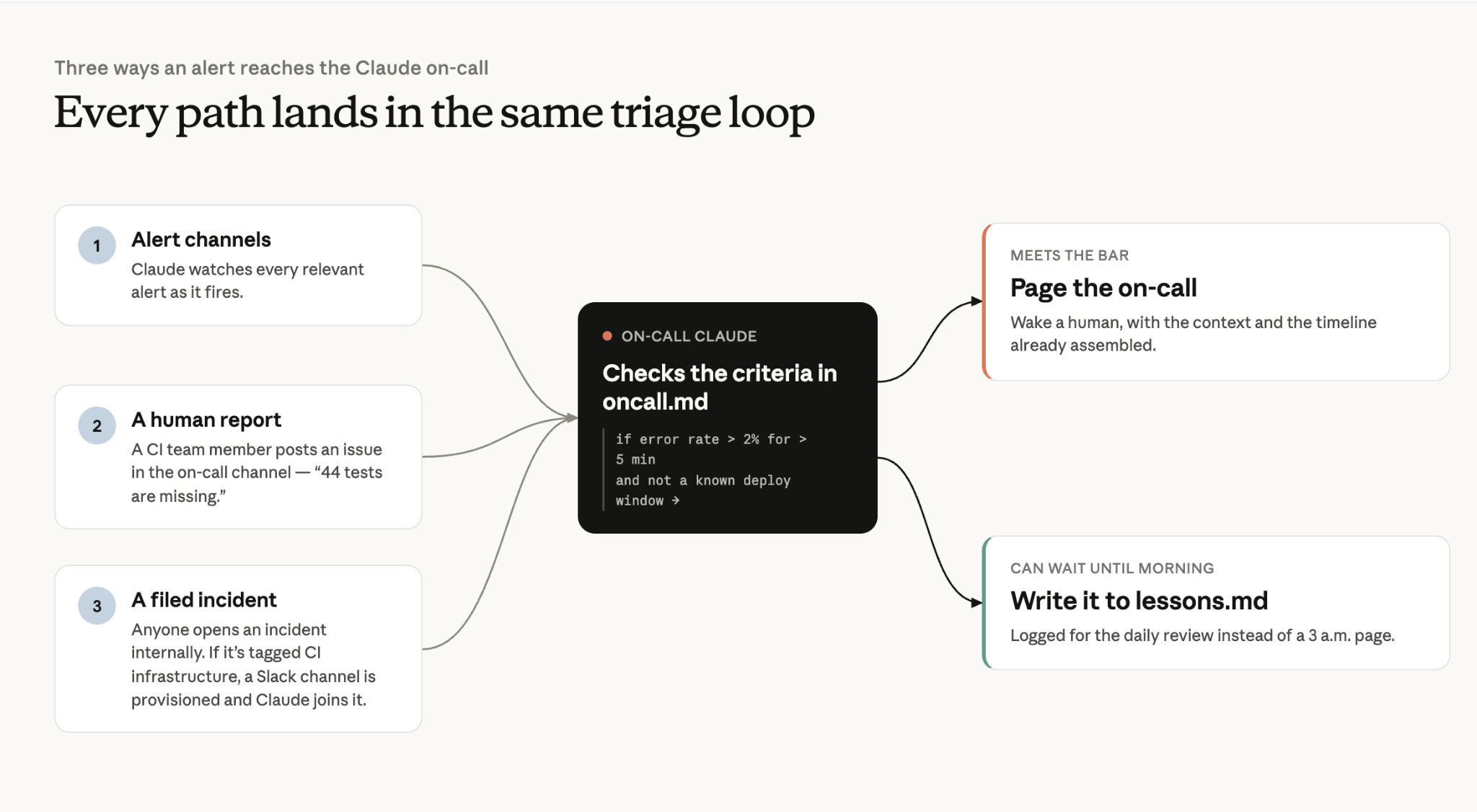
The key takeaway here is that the alerting process is deterministic, while on-call escalation has both deterministic and agentic paths.
这里要记住的是:告警流程是确定性的,而值班升级既有确定性的路径,也有 agent 自主判断的路径。
Triage排查
It's one thing to have Claude filter through the alert noise, but the real savings comes from the investigation. Claude posts its first evidence-grounded analysis a median of 14 minutes after an incident opens, and in the fastest cases names the root cause within 4 minutes in its first report.
让 Claude 从一堆告警噪音里筛东西是一回事,真正省下大把时间的是调查。故障开出来之后,Claude 发出第一份有证据支撑的分析,中位数是 14 分钟;最快的几次,它在 4 分钟内的第一份报告里就点出了根因。
When an alert has been escalated to an incident, Claude is often ready in our Slack channel with a hypothesis grounded in evidence that we can review. Claude Tag kicks off a dynamic workflow with an orchestration agent that spins up executor subagents to investigate each dependency and source of truth.
一条告警升级成故障的时候,Claude 往往已经在 Slack 频道里等着了,带着一个有证据支撑的假设给我们审。Claude Tag 会启动一个动态工作流:由一个编排 agent 拉起若干执行子 agent,分头去查每个依赖和每个事实来源。
For us that’s Grafana, our log store, PagerDuty, GitHub, Kubernetes and Slack incident channels–all wired up via MCP Connectors. Claude can chase multiple leads in parallel, helping to reduce MTTR (mean time to resolution).
对我们来说,这些来源是 Grafana、日志存储、PagerDuty、GitHub、Kubernetes 和 Slack 故障频道,全都通过 MCP 连接器接好了。Claude 能同时追好几条线索,帮我们缩短 MTTR(平均解决时间,mean time to resolution)。
Executors report the findings back to the orchestration agent which synthesizes and surfaces the information in a coherent SITREP.
执行 agent 把发现报回给编排 agent,由它汇总,整理成一份连贯的 SITREP(态势报告)发出来。
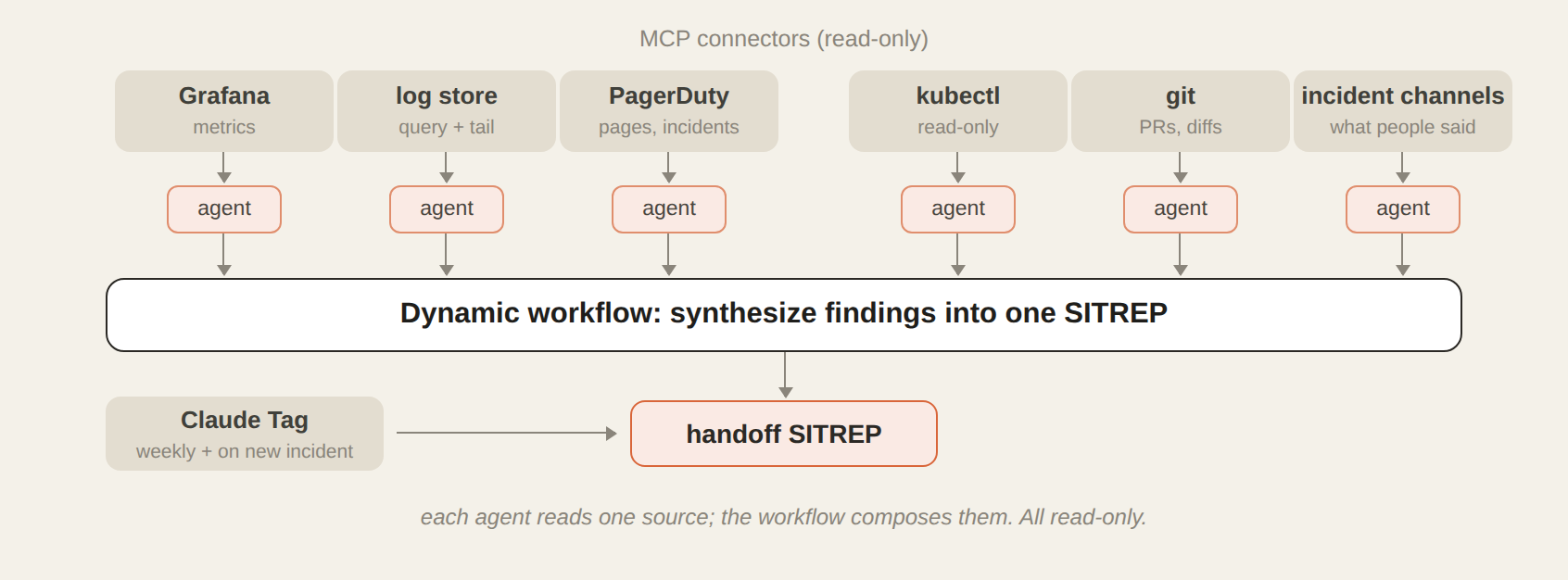
The orchestrator and executor agents aren’t searching blind. They are guided by an investigation skill with more detailed reference markdown files for each bug class.
编排 agent 和执行 agent 并不是瞎找。指导它们的是一个调查 skill,里面还有按每类 bug 分开写的更详细的参考 markdown 文件。
For example, a 617 line investigation skill for shadow divergence bugs encodes every step I take during a typical investigation. I built it by troubleshooting with Claude turn-by-turn during one of the incidents and then had it create the file from that experience.
比如针对影子分歧(shadow divergence)这类 bug,有一个 617 行的调查 skill,把我平时调查时走的每一步都写了进去。做法是:在一次故障里,我和 Claude 一来一回地一起排查,然后让它根据这次经历写出这个文件。
Lessons.md also guides Claude’s troubleshooting. This markdown file is a running log of every incident we've resolved: what happened, the root cause, the fix, and the gotcha worth remembering. Claude appends to it on its own automatically. Every new investigation starts by reading it, so Claude's first hypothesis starts with what has happened recently.
lessons.md 也在指导 Claude 排查。这个 markdown 文件是一份持续更新的日志,记着我们解决过的每起故障:发生了什么、根因、怎么修的,还有值得记住的坑。Claude 会自己往里追加。每次新的调查都从读它开始,所以 Claude 的第一个假设是从最近发生过的事出发的。
If the same pattern shows up enough times, we promote it into the investigation skill itself. My favorite entry is one Claude wrote about me. I'd made an assumption from a config file before checking the metrics, and the lessons.md file now states, "query the data first, then theorize. Config tells you what could go wrong; metrics tell you what did."
同一种模式出现的次数够多了,我们就把它提进调查 skill 里。我最喜欢的一条是 Claude 写我的。当时我还没看指标,就根据一个配置文件下了判断,现在 lessons.md 里写着:「先查数据,再下推论。配置告诉你什么可能出错,指标告诉你什么真的出错了。」
Even with these tools and context, Claude doesn’t always get it right the first time. Human intuition and experience matter. Claude Tag allows the team to troubleshoot incidents in multi-player mode. Either of us can steer the investigation or add a hypothesis in real-time, together.
就算有了这些工具和上下文,Claude 也不是每次一上来就对。人的直觉和经验依然要紧。Claude Tag 让团队可以「多人模式」排查故障:我们谁都可以实时调整调查方向、补一个假设,大家一起来。
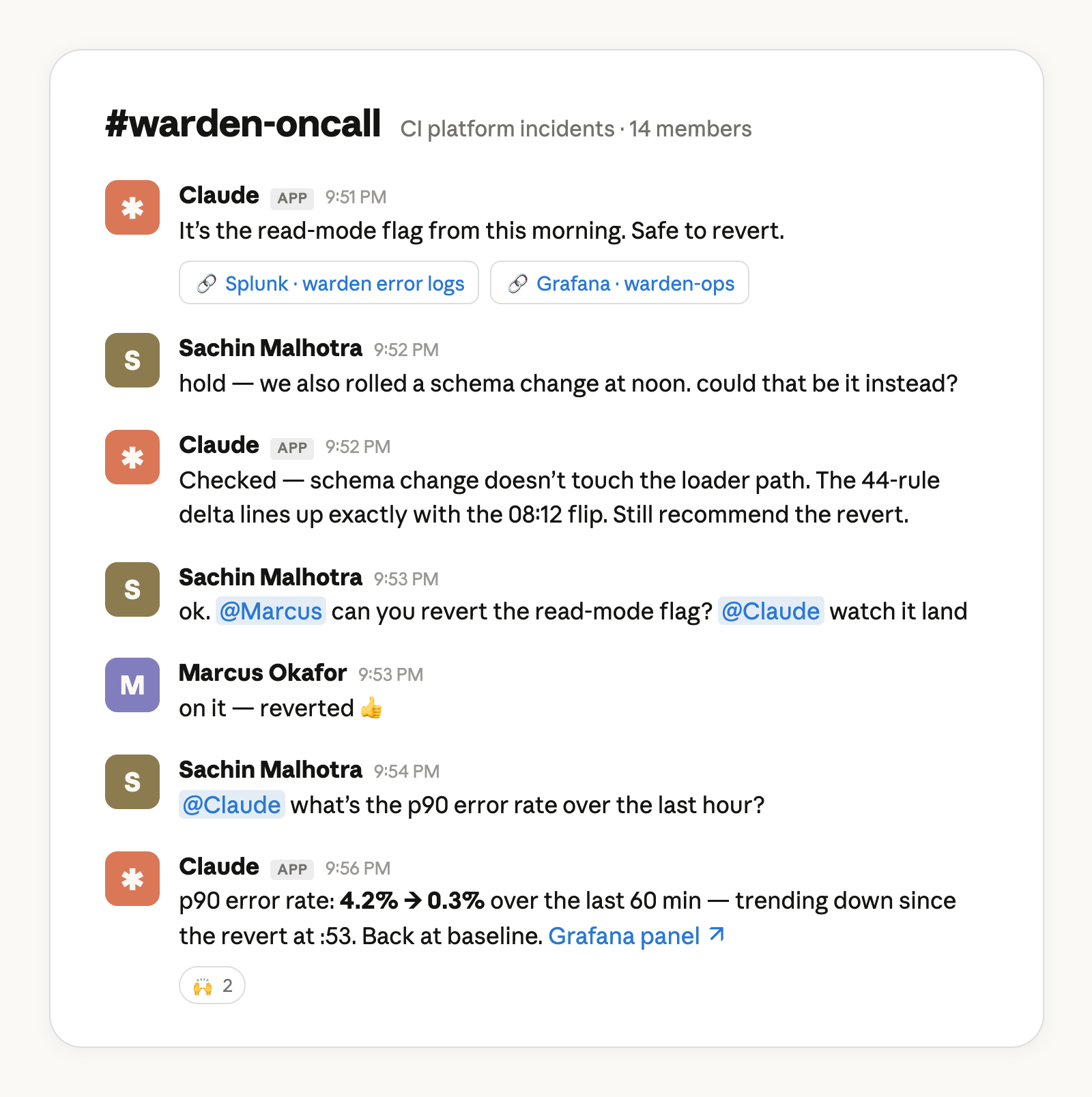
Recreated from a real conversation for clarity.
根据一次真实对话重新制作,便于阅读。
Resolution修复
If Claude can escalate and troubleshoot alerts, can it fix them too? The answer to this question will vary from team to team, but here’s how we do it.
既然 Claude 能升级告警、能排查,那它能不能顺手修了?每个团队的答案会不一样,下面说说我们的做法。
Most deployments within our team happen behind a feature flag. I have created a separate agent in Claude Code, with my permissions, capable of progressive deployment behind each of these feature flags.
我们团队的大部分部署都藏在功能开关后面。我在 Claude Code 里另外建了一个 agent,用的是我的权限,能在这些功能开关后面做渐进式部署。
The first stage of our rollout process usually involves Claude managing canary traffic, monitoring for issues, and automatically ramping a given feature flag up or down. This could be an entirely separate article, so I won't go into more detail here.
我们上线流程的第一阶段,通常是由 Claude 管理金丝雀流量(canary traffic)、盯着有没有问题,并自动把某个功能开关调高或调低。这块单独都能写一篇文章了,这里就不展开。
Other resolution paths that Claude Tag helps my team with are:
Claude Tag 还在这几种修复方式上帮我们团队:
- Letting us know if we need to drain or cordon off certain sections of our Kubernetes cluster;.告诉我们 Kubernetes 集群的哪些部分需要排空(drain)或隔离(cordon);
- Giving us instructions on how to scale up some of our infrastructure in responses to demand-surges (this is rare but it’s very helpful when Claude comes back with exactly what we can do for mitigation); and, most frequently,需求激增时,告诉我们怎么给一部分基础设施扩容(这种情况不多,但 Claude 能直接给出具体的缓解办法,这时候特别有用);还有最常见的,
- Fixes in the form of a PR that the on-call can review, merge, and then deploy for a swift resolution.直接提一个修复 PR,值班的人审完、合并、部署,问题很快就解决了。
Verification, communication, and handoff验证、通报和交接
Claude uses many of the same MCP Connectors and tools that it did for its investigation to verify the fix worked as intended. As part of the standing instructions in oncall.md, it writes a post-mortem to lessons.md and for the handoff SITREP.
验证修复有没有生效,Claude 用的很多是调查时用过的那些 MCP 连接器和工具。按 oncall.md 里的长期指令,它会写一份事后复盘(post-mortem),记进 lessons.md,也放进交接用的 SITREP。
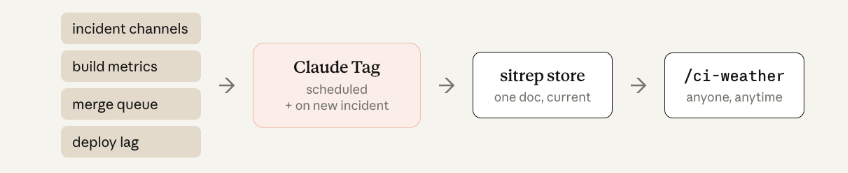
To communicate the full picture across multiple incidents, we created an agent called ci-weather. It compiles information from each incident Slack channel, build metrics, merge queue stats, and deploy lag. Then it posts a newsroom-style report to one public channel anyone in the company can read. Now, our engineers can reference that channel rather than pinging us when they are trying to determine if they should hold their merges or if they’re trying to answer “what’s wrong with CI?”.
为了把多起故障的全貌讲清楚,我们做了一个叫 ci-weather 的 agent。它从每个故障的 Slack 频道、构建指标、合并队列统计和部署延迟里汇总信息,然后往一个公司里谁都能看的公开频道发一份新闻播报式的报告。现在工程师想知道要不要先别合并,或者想弄明白「CI 到底怎么了」,看这个频道就行,不用再来找我们。
One honest note: we needed to iterate the report format several times. Claude can one-shot a skill that generates a status report, but what makes it readable is team-specific taste. It's human communication, not plumbing.
说句实话:报告格式我们改了好几轮。Claude 一次就能写出一个生成状态报告的 skill,但报告好不好读,取决于团队自己的口味。说到底这是人和人之间的沟通,不是搭管道的活。
Finally, while Claude keeps a journal for itself in lessons.md, we also want to produce handoff reports for humans as well every Monday. Claude produces daily and weekly summaries so one member of the team can pick up where the other left off.
最后,Claude 在 lessons.md 里给自己记日志,我们也希望每周一给人出一份交接报告。Claude 会写每日和每周的总结,这样团队里一个人能接着另一个人留下的进度往下做。
From monitoring incidents to monitoring an incident response system从盯故障,到盯一套故障响应系统
Our software engineers on average ship 8x as much code per quarter as they did from 2021 to 2025. And while we have kept the quality bar high (every PR has a named human owner, every change requires approval to merge, every change goes through the same set of CI gates), the only way to keep up with agentic coding is agentic CI.
我们的软件工程师现在平均每季度交付的代码量是 2021 到 2025 年间的 8 倍。质量标准我们一直没降(每个 PR 都有一个具体的人负责,每个改动都要审批才能合并,每个改动都要过同一套 CI 关卡),但要跟上 agent 写代码的速度,唯一的办法就是让 CI 也交给 agent。
Claude has absorbed the tedious parts of my job, the after-hours disruptions and the incident comms, while allowing me to focus on the medium and long term architectural changes that truly move the needle for system reliability.
我工作里那些磨人的部分,下班后被打扰、故障期间的沟通,都被 Claude 接走了,我能专心做那些中长期的架构改动,这些才真正能提升系统可靠性。
The best part of what we have built is that it doesn’t feel scattered. Our on-call processes live in Slack, but now Claude has joined the channel.
我们搭的这套东西最好的一点是不散。值班流程本来就在 Slack 里,现在只是 Claude 也进了频道。
How to get started:
怎么开始:
- You’ll need a Claude Team or Claude Enterprise plan你得有 Claude Team 或 Claude Enterprise 套餐
- The organization owner needs to add Claude to the on call Slack channel via Claude Tag组织所有者要通过 Claude Tag 把 Claude 加进值班 Slack 频道
- The org owner also needs to help connect Claude in the on-call Slack channel to the appropriate connectors, GitHub repo, and set up Claude Code Remote.组织所有者还要帮忙给值班频道里的 Claude 接上合适的连接器和 GitHub 仓库,并配好 Claude Code Remote。
- Add Claude to your incident channel and instruct it to monitor for incidents and immediately triage把 Claude 加进故障频道,让它盯着故障、一出事马上排查
This article was written by Sachin Malhotra, technical member of Anthropic staff with contributions from Michael Segner, Anthropic staff.
本文由 Anthropic 技术人员 Sachin Malhotra 撰写,Anthropic 员工 Michael Segner 也有贡献。